Best Text to Video AI Tools 2026: Free AI Generators - BSTB

Psst! 30 script-to-screen tools

30 Best Text to Video AI Tools in 2026 for Scripts, Prompts and Explainers

Text to video AI tools turn written input into finished video. Some take a one-line prompt and generate a scene, some take a full script and build a narrated video around it, and some put an avatar on screen to read it out. This page ranks the 30 best text to video tools on BSTB by their 9-criterion score, each with its pricing model, free plan, clip length and a plain-English summary.

Top 30 of 62 tools 21 of 30 free to start
Best text to video AI tools: Scout the BSTB robot beside a script page and the three generated scenes it became

Why You Can Trust BSTB's AI Tool Listings

Every text to video tool on this page has its own BSTB page with a pricing model, plan prices, the clip length and resolution it produces, and a score from the same nine criteria.

  • One scoring method for every tool
  • Prices taken from each tool's official pages
  • Plain summaries of what the tool actually does

See how BSTB tests and scores AI tools.

The directory

Top 30 Text to Video AI Tools, Ranked by BSTB Score

Synthesia and Powtoon score highest at 4.2/5, with AI Studios, Colossyan and Runway behind at 4.1/5; filter by price or by what you are turning into video.

Show:

Showing 30 of 30. Picked from the 62 tools in the BSTB Text to video category and ranked by overall score.

Powtoon

4.2/5Freemium

Animated explainer maker that turns scripts, documents and slides into training content on a drag-and-drop canvas.

  • Best for: Animated explainers from a document
  • Price: Free $0; Lite $15/mo yearly; Professional $40/mo yearly; Advanced $125/mo
Read the Powtoon review

AI Studios

4.1/5Freemium

DeepBrain AI's tool for script, document and link to presenter video. Free gives 1 minute at 720p, Team 60 minutes at 4K.

  • Best for: Longer presenter videos with 4K output
  • Price: Free $0; Personal $24/mo yearly ($29 monthly); Team $55 per seat/mo
Read the AI Studios review

Colossyan

4.1/5Freemium

Turns documents, slides and web pages into avatar-presented training video with quizzes, branching and SCORM export.

  • Best for: Learning teams that need SCORM
  • Price: Starter free; Professional $59/mo billed yearly; Enterprise on request
Read the Colossyan review

Runway

4.1/5Freemium

Generates and edits video from text prompts, images or footage. Credits buy roughly 52 seconds of Gen-4.5 on Standard, more on higher plans.

  • Best for: Prompt-to-shot with real control
  • Price: Free $0; Standard $15/mo ($12 yearly); Pro $35/mo; Max $95/mo
Read the Runway review

Fliz

4.0/5Freemium

Video agent that turns a blog post, an article link or plain text into a finished video with script, visuals and voiceover.

  • Best for: Publishing a blog post as video
  • Price: First video free; Starter $14.90/mo; Creator $29.90/mo; Advanced $69.90/mo
Read the Fliz review

Kling AI

4.0/5Freemium

Creates short clips from text, images and reference footage with native audio and lip-sync. 15 seconds a generation, 1080p on paid plans.

  • Best for: Multi-shot scenes with sound
  • Price: Free $0; Standard $10/mo ($79.20/yr); Pro $37/mo; Premier $92/mo
Read the Kling AI review

Pictory

4.0/5Paid

Turns scripts, blog posts, slides and audio into 1080p video with stock visuals and captions, up to 30 minutes long.

  • Best for: Long-form content repurposed to video
  • Price: 14-day free trial; Starter $29/mo ($25 annual); Professional $59/mo
Read the Pictory review

Vidu AI

4.0/5Freemium

Generates clips of up to 16 seconds at 1080p from text, images and reference photos, with native sound.

  • Best for: The longest single clip here
  • Price: Free $0; Standard $10/mo (about $8 yearly); Premium $35/mo; Ultimate $99/mo
Read the Vidu AI review

X-Pilot AI

4.0/5Freemium

Turns PDFs, slides, documents and topics into editable course and training videos with animated scenes and an avatar.

  • Best for: Course material into lessons
  • Price: Free $0 (one video); Creator $19/mo; Professional $49/mo; Ultra $129/mo
Read the X-Pilot AI review

DomoAI

3.9/5Freemium

Restyles footage into anime and other looks and generates clips, talking avatars of up to 60 seconds and 4K upscales.

  • Best for: Stylised and anime output
  • Price: Free $0; Basic $9/mo yearly ($13 monthly); Standard $29/mo; Pro $99/mo
Read the DomoAI review

Elai.io

3.9/5Freemium

Converts scripts, slide decks and web articles into narrated presenter video voiced by AI avatars.

  • Best for: Slides and articles into presenter video
  • Price: Free $0 (1 minute); Creator $29/mo ($276/yr, 15 min); Team $125/mo
Read the Elai.io review

JoggAI

3.9/5Freemium

Creates presenter videos and product ads from scripts, photos or store links, using more than 450 AI avatars.

  • Best for: Product ads at volume
  • Price: Free $0 (200 credits, 3 min); Starter $24/mo yearly (30 min); Team $215/mo
Read the JoggAI review

Kinovi

3.9/5Freemium

Studio and REST API bundling more than 30 video, image and audio models on shared credits, from 480p to 4K.

  • Best for: One-off credit packs, no subscription
  • Price: Free credits; Starter $9.99 one-time; XL $99.90 one-time; Studio $999.90
Read the Kinovi review

AICUT

3.8/5Freemium

Turns prompts, topics or images into faceless shorts with script, voiceover, captions and rendered scenes.

  • Best for: Faceless shorts on autopilot
  • Price: Free $0 (tokens at $0.60 each); Creator $19.99/mo ($149.99/yr); Automate $39.99/mo
Read the AICUT review

Argil

3.8/5Paid

Turns scripts into short video with consistent AI characters and personal clones, with a director that plans the shots.

  • Best for: Character consistency across shots
  • Price: Pro from $50/mo; Studio $1,250/mo; Enterprise from $2,500/mo
Read the Argil review

KaraVideo

3.8/5Freemium

Offers Sora, Veo, Kling and Runway from one dashboard on a shared credit pool, for short clips.

  • Best for: Model access without several subscriptions
  • Price: Free $0; Lite $10/mo; Pro not published
Read the KaraVideo review

Lumen5

3.8/5Freemium

Turns blog posts and raw text into short branded video with scripts, footage and music, up to 1080p.

  • Best for: Marketing teams repurposing posts
  • Price: Free $0; Basic reported $19/mo yearly; Starter reported $59/mo yearly
Read the Lumen5 review

Pika

3.8/5Freemium

Generates short videos from text or images with its own model, plus product ads and clip editing tools.

  • Best for: Playful short-form generation
  • Price: Free $0; Starter $10/mo ($8 yearly); Creator $35/mo ($28 yearly)
Read the Pika review

PixMax AI

3.8/5Freemium

Canvas bringing third-party video, image, audio and 3D models together, with an agent that turns scripts into storyboards.

  • Best for: Storyboarding before generating
  • Price: Free $0; Starter $15/mo; Pro $42/mo; Ultra $234/mo; pay as you go
Read the PixMax AI review

Vmaker AI

3.9/5Freemium

Animaker's editor and screen recorder with script-to-video and avatar video alongside captions and reframing, up to 4K.

  • Best for: Recording and generating in one place
  • Price: Free Lite $0; Starter $18/mo yearly ($24 monthly); Teams $25/mo yearly
Read the Vmaker AI review

Vsub

3.8/5Paid

Turns scripts or voiceovers into narrated, illustrated faceless video with automatic captions, taking scripts to 30,000 characters.

  • Best for: Agencies running faceless channels
  • Price: Premium $99/mo; Premium+ $199/mo; Max $499/mo
Read the Vsub review
The basics

What Are Text to Video AI Tools?

Text to video tools convert writing into video. The input decides the product: a short prompt generates a scene, a full script produces a narrated video, and a document becomes an explainer or a course.

Treat these as three different jobs. Prompt to scene, in tools such as Runway, Kling AI and Vidu AI, produces a few seconds of generated footage. Script to video, in Pictory, Lumen5 and Fliz, builds a longer narrated piece from stock visuals. Script to presenter, in Synthesia and AI Studios, puts an avatar on screen reading your words.

The single most useful number in this category is clip length. Scene models stop at 5 to 16 seconds, while avatar and script tools comfortably produce minutes. If you know the length of the finished video, you have already narrowed the list to one group.

How Does Text to Video Actually Work?

Scene models generate frames that match your words. Script tools do something simpler: they write or take a script, generate a voiceover, then match stock footage or an avatar to it, section by section.

  1. Your text becomes a plan

    Script tools split the writing into scenes and decide what each one shows. This is the step worth editing, because the visuals follow it.

  2. Voice comes before pictures

    Most script-to-video tools generate the narration first and cut the visuals to its timing, which is why the pacing feels even.

  3. Scene models predict frames

    A generative model produces a short clip directly from the prompt, with no stock footage involved, which is why it can invent anything and get it wrong.

  4. Captions and format last

    Subtitles, aspect ratio and music are applied at the end, and are the parts most tools do well.

What Can You Make From Text?

Generated scenes from a prompt, narrated videos from a blog post or script, presenter-led training and courses, faceless social shorts, product ads from a store link, and animated explainers.

  • Scenes from a prompt: a few seconds of footage for b-roll, concepts or social.
  • Blog posts into video: an article becomes a narrated, captioned clip with matching visuals.
  • Training and courses: a document or slide deck becomes a presenter-led lesson, with quizzes in some tools.
  • Faceless shorts: script, voiceover, captions and visuals assembled for a short-form channel.
  • Product ads: a store link or script becomes an ad read by an avatar, in several variants.
  • Animated explainers: illustrated video where photoreal footage would be wrong anyway.
By input type

Best Text to Video Tools by What You Start From

Pick by your input: a one-line prompt, a full script or article, a script you want an avatar to read, a document that should become a lesson, or an idea for a faceless social clip.

Prompt to a generated scene

Generative models that turn a prompt into a few seconds of new footage.

Script, article or blog post to video

AI tools that turn a script, article or blog post into a narrated video.

  • Fliz: Publishing a blog post as video
  • Pictory: Long-form content repurposed to video
  • Flickify: Publishers converting archives
  • Lumen5: Marketing teams repurposing posts
  • Vmaker AI: Recording and generating in one place

Script to a presenter on camera

AI tools that put a synthetic presenter on screen to deliver your script.

Explainer, course and training video

AI tools for explainer, course and training video built from documents.

Faceless and short-form social video

AI tools for faceless short-form video with script, voiceover and captions.

  • Kinovi: One-off credit packs, no subscription
  • AICUT: Faceless shorts on autopilot
  • PixMax AI: Storyboarding before generating
  • Vsub: Agencies running faceless channels
Know the difference

Prompt to Scene vs Script to Video vs Script to Presenter

A prompt gives you seconds of invented footage, a script gives you minutes of stock-based video, and a presenter gives you minutes of avatar-led video. Length and predictability separate them.

Prompt to sceneScript to videoScript to presenter
InputA sentence describing one shotA script, article or blog URLA script, document or link
Output length5 to 16 seconds a clipMinutes, up to 30 in some toolsMinutes, limited by plan
VisualsGenerated, unpredictableStock footage matched to the wordsAn avatar against a background
Best forB-roll, concepts, music-led socialRepurposing articles, faceless channelsTraining, onboarding, localised ads
Main weaknessShort, inconsistent between shotsGeneric stock, nothing originalViewers can tell it is an avatar
Examples on BSTBRunway, Kling AI, Vidu AI, Pika, Magic HourPictory, Lumen5, Fliz, Flickify, Vmaker AISynthesia, AI Studios, D-ID, Elai.io, JoggAI
What to look for

What Makes a Good Text to Video Tool?

A good tool publishes its clip length and resolution, follows the script rather than paraphrasing it, gives you control over scenes and visuals, produces usable audio, and lets you edit the result.

  • Published length and resolutionThe two numbers that decide whether a tool fits your project. A page that will not state them is hiding a short cap.
  • Follows your scriptSome tools rewrite your words to fit their scenes. For training and compliance video that is a serious problem.
  • Scene-level controlYou should be able to change one visual, re-record one line and reorder scenes without regenerating everything.
  • Audio you can live withVoice quality and lip-sync vary widely. Listen to a full minute, not the demo sentence.
  • An editing stepGenerated video almost always needs trimming and captions. A built-in editor saves a round trip.
  • A free tier that produces something21 of the 30 tools here are free to start, usually watermarked and capped at 720p or one video.

These overlap with BSTB's nine scoring criteria, which also weigh ease of use, support, speed and integrations.

Step by step

How to Write a Text to Video Prompt That Works

Describe one shot: subject, action, camera move, lighting and mood, in that order. Keep it to a single continuous moment, say what to exclude, and change one element at a time between attempts.

  1. Name the subject and action

    "A paper boat drifting down a flooded street" is a shot. "A story about a rainy day in the city" is not, and will produce a muddle.

  2. Add camera and lighting

    Push in, handheld, slow pan, shallow depth of field, golden hour, overcast. This vocabulary does more than any adjective about mood.

  3. Keep it to one continuous moment

    No cuts, no scene changes, no sequence of events. Generate the next shot separately and join them afterwards.

  4. Say what you do not want

    Most models accept exclusions, and on-screen text is the thing worth excluding: generated lettering is almost always wrong.

  5. Change one thing per attempt

    Keep the seed or reference image where the tool offers one, so you learn what actually changed the result. Vidu AI and Runway both support reference images.

Buyer checklist

How to Choose a Text to Video Tool

Start from the finished length, then match the input you have, test your own script on the free tier, check whether you can edit the result, and read the licence before any client work.

  1. Start from the finished length

    Under 20 seconds, a scene model works. Over a minute, you need a script or avatar tool. This single question removes two thirds of the list.

  2. Match your input

    A prompt, an article, a script or a slide deck. Use the Input type filter above the grid.

  3. Test your own script

    Not the demo. Your terminology, your product names, your sentence length, read by their voice.

  4. Check the editing step

    Can you change one scene, swap a clip or fix a line without regenerating the whole video? If not, factor in an editor.

  5. Read the licence

    Commercial rights are usually on paid plans only, and free tiers often watermark. Confirm before a client campaign.

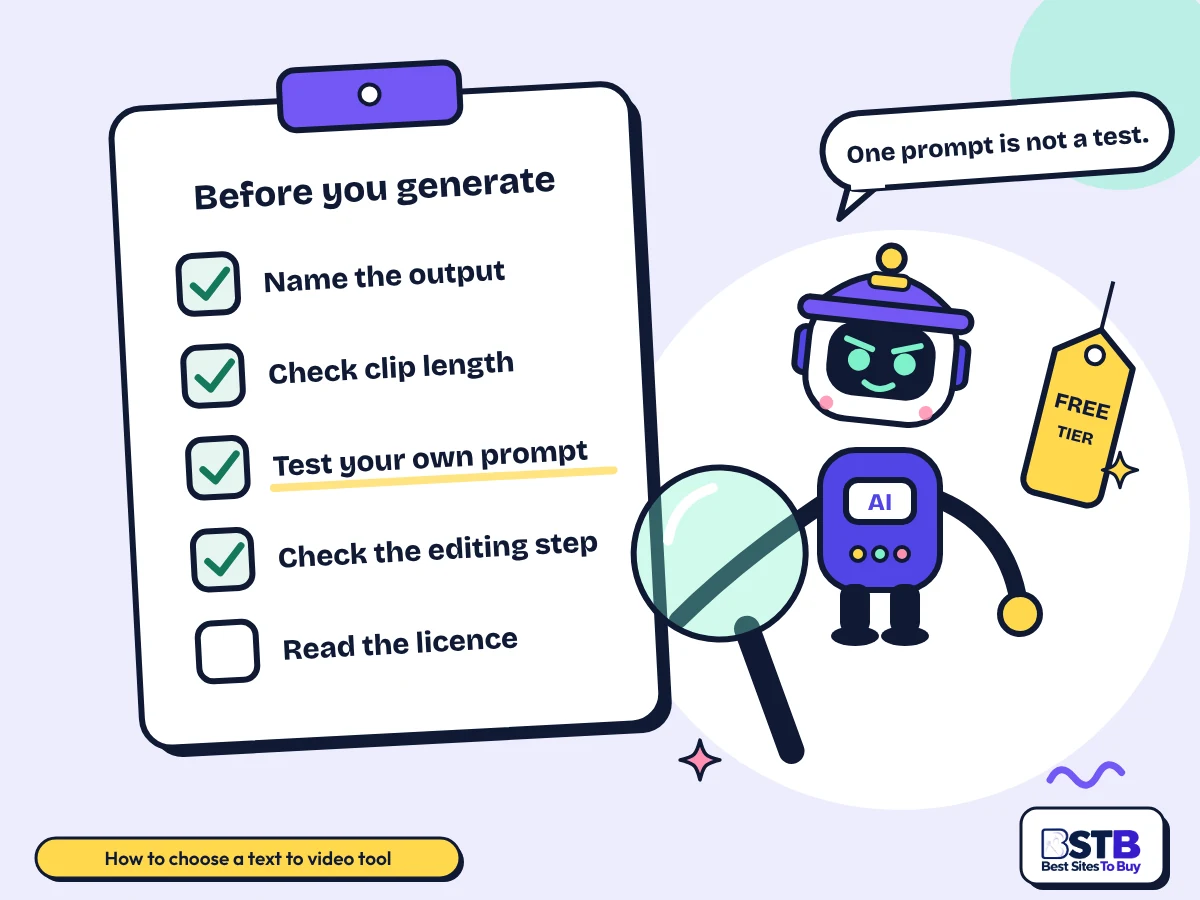
How to choose a text to video AI tool: Scout in a detective cap checking a 5-step checklist with a magnifying glass
Five checks to run before you buy credits for a video you cannot finish.
Pricing

Free vs Paid Text to Video Tools

Most are freemium: 21 of the 30 here are free to start and 9 are paid or trial only. Entry plans cluster between $10 and $30 a month, with avatar and agency tools reaching $99 and beyond.

Pricing modelTools in the top 30What you getTools
Free0 of 30Everything free, no paid tier
Freemium21 of 30Free plan with limits, paid upgradeSynthesia, Powtoon, AI Studios, Colossyan, Runway, Fliz, Kling AI, Magic Hour AI, Vidu AI, X-Pilot AI, Conch Video, DomoAI, Elai.io, JoggAI, Kinovi, AICUT, KaraVideo, Lumen5, Pika, PixMax AI, Vmaker AI
Paid9 of 30Paid only, sometimes with a trialCreative Reality Studio (D-ID), Magnific AI Video Generator, Pictory, Ankon AI, Argil, Flickify, Noodle Tomato, Synthesys Studio, Vsub

Prices come from each tool's BSTB page. Free tiers are measured in minutes of output, credits or a single video, and almost always watermark the result. The cost that surprises people is retries: a usable 10-second clip from a scene model often takes three or four generations. Confirm on the vendor's site before you buy.

Use with care

Length, Editing and Commercial Rights

Generated scenes are short and inconsistent, script tools lean on generic stock, avatars read as avatars, and almost everything needs finishing in an editor before it is publishable.

  • Clip length: 5 to 16 seconds from scene models. Length comes from joining clips, and every join risks a visible shift.
  • Consistency: a character, product or style rarely survives unchanged across several generations.
  • Generic visuals: stock-based tools produce competent video that looks like everyone else's.
  • On-screen text: generated lettering is usually wrong. Add titles and captions in an editor afterwards.
  • The editing step: most output needs trimming, captions and audio work. See the AI video editing tools category.
  • Rights and disclosure: commercial use is usually a paid-plan feature, and several markets now expect synthetic media in ads to be labelled.
Our method

How BSTB Rates Text to Video Tools

BSTB scores every one of these text to video tools on the same nine criteria, and the overall score on each card is the plain average of the nine.

  • Accuracy and Reliability
  • Ease of Use
  • Functionality and Features
  • Performance and Speed
  • Customization and Flexibility
  • Data Privacy and Security
  • Support and Resources
  • Cost-Efficiency
  • Integration Capabilities

Scores are based on each tool's official pages, documentation, pricing and public user feedback. Read the full method on how BSTB tests and scores tools.

Related AI Tool Categories

Text to video tools overlap with these categories. Browse them when you need a narrower tool, or go back to the full AI tools directory.

FAQs

Text to Video AI Tools: Frequently Asked Questions

Quick answers on turning a prompt into video, converting a full script, how detailed a prompt should be, camera and style control, dialogue and sound, clip length, editing afterwards and commercial use.

How Do I Turn a Text Prompt Into a Video?

Pick a scene model, describe one shot in a sentence, and generate. Runway, Kling AI, Vidu AI, Pika and Magic Hour AI all take a written prompt and return a clip of a few seconds.

The common mistake is describing a story rather than a shot. These models produce one continuous moment, so a prompt covering several events returns something confused. Write the shot, generate the next one separately.

  • Runway: 4.1/5; the most control, with reference images and 4K upscaling.
  • Kling AI: 4.0/5; 15 seconds a generation with native audio and lip-sync.
  • Vidu AI: 4.0/5; up to 16 seconds at 1080p, the longest single clip here.
  • Magic Hour AI: 4.0/5; free daily credits for repeated attempts.

Budget three or four attempts for every clip you keep. That is normal, not a prompting failure.

Can AI Convert a Script Into a Complete Video?

Yes, and this is where these tools are strongest. Pictory, Lumen5, Fliz, Flickify and Vmaker AI take a full script or article and return a narrated, captioned video of several minutes.

The visuals come from stock libraries rather than generation, which is why the result is reliable and a little generic. For a presenter instead of stock, use an avatar tool such as Synthesia or AI Studios.

  • Pictory: 4.0/5; scripts, blog posts and slides into 1080p video up to 30 minutes.
  • Lumen5: 3.8/5; blog posts into branded short video for marketers.
  • Fliz: 4.0/5; an article link becomes a video with script, visuals and voiceover.
  • Noodle Tomato: 3.8/5; narrated video up to two hours, the longest output here.

Edit the scene plan before rendering. Changing a visual afterwards costs another render.

How Detailed Should a Text to Video Prompt Be?

For a scene model, one or two sentences covering subject, action, camera move and lighting. Longer prompts do not help: beyond about 40 words most models start ignoring the later details.

Detail should go into the things the model cannot infer, which are camera and light, not adjectives about atmosphere. For script tools the opposite applies: give the whole script, because they are reading rather than imagining.

  • Scene models: one shot, 20 to 40 words, camera and lighting named.
  • Useful vocabulary: push in, handheld, slow pan, shallow depth of field, golden hour, overcast.
  • Not useful: stacked adjectives, story beats, anything requiring a cut.
  • Script tools: the full script, because the pacing follows the words.

Exclude on-screen text explicitly. Generated lettering is almost always wrong.

Can I Control Camera Movement and Scene Style?

Yes, increasingly. Higgsfield offers preset camera moves, Runway and Vidu AI accept reference images and style instructions, and Kling AI supports multi-shot scenes with consistent framing.

Camera control is the fastest-improving part of the category. Style control is still largely achieved by giving a reference image, which anchors colour, composition and look far better than describing them.

  • Camera presets: Higgsfield for push-ins, orbits and cinematic moves.
  • Reference images: Runway and Vidu AI use a still to anchor the look.
  • Seeds: reuse a seed to keep results comparable between attempts.
  • Multi-shot: Kling AI holds framing across shots in one generation.

Anchor with an image rather than adjectives. It gets you closer in fewer attempts.

Can Text to Video Tools Generate Dialogue and Sound?

Yes. Kling AI and Vidu AI generate native audio with the clip, and avatar tools such as Synthesia, D-ID and Elai.io produce lip-synced speech from your script in many languages.

Scene-model audio is new and variable: ambient sound is often convincing, dialogue less so. Avatar speech is mature and predictable, which is why commercial projects that need spoken words mostly use avatar tools.

  • Native scene audio: Kling AI and Vidu AI generate sound with the footage.
  • Avatar speech: Synthesia 140+ languages, AI Studios 150+, D-ID with translation.
  • Narration over stock: Pictory, Lumen5, Fliki and Vsub generate a voiceover.
  • Still added later: music and sound design, in almost every case.

Listen to a full minute of the voice before committing. Demos use the sentence it reads best.

How Long Can an AI-Generated Video Be?

A scene model gives 5 to 16 seconds per clip. Script and avatar tools go much further: Pictory and Synthesys Studio reach 30 minutes, and Noodle Tomato states up to two hours.

This is the number that decides which tool you need, and the one competitor pages most often leave out. Longer scene-model videos exist, but they are several clips joined, with a consistency risk at every join.

  • Scene models: Vidu AI up to 16 seconds, Kling AI 15 a generation.
  • Avatar tools: minutes, usually capped by plan rather than by the model.
  • Script tools: Pictory 30 minutes, Noodle Tomato up to two hours.
  • Joining clips: possible, but style and character can shift at each cut.

Decide the finished length first. It narrows the list faster than any other question.

Can I Edit a Video After Generating It From Text?

In most tools, yes, at scene level: swap a clip, re-record a line, change the captions or reorder scenes. Scene models are the exception, where editing usually means regenerating.

Script and avatar tools are built around editing, because changing one sentence should not mean rebuilding the video. For generated scenes, plan to finish in a real editor instead.

  • Scene-level editing: Pictory, Lumen5, Vmaker AI, VEED and most avatar tools.
  • Regeneration instead: most scene models, where a change means a new clip.
  • Finish elsewhere: the AI video editing tools category covers cutting, captions and audio.
  • Keep the source: scripts and prompts, so you can reproduce a scene later.

Ask how a single-line change is handled. It tells you more than any feature list.

Can I Use Text to Video Outputs Commercially?

Usually on a paid plan. Most tools grant commercial rights to subscribers, while free tiers watermark the output and often restrict it to personal use. Check the specific terms before a client project.

Two further points. Copyright protection for purely generated footage is limited in several jurisdictions, and advertising regulators in a growing number of markets expect synthetic presenters and footage to be disclosed.

  • Usually granted: commercial rights on paid plans, stated in the terms.
  • Often restricted: free tiers, with watermarks and personal-use limits.
  • Avatars: check whether the likeness licence covers ads as well as internal video.
  • Disclosure: synthetic media labelling is increasingly expected in advertising.

Get the licence in writing before the first render on any client campaign.

Which Text to Video Tools Are Free?

21 of the 30 here are free to start. Magic Hour AI gives free daily credits, and Runway, Kling AI, Vidu AI, Pika, Synthesia, Powtoon and Colossyan all have free tiers, normally watermarked.

Free tiers here are measured in minutes, credits or a single video. They are enough to judge whether a tool fits, and not enough to finish a project, which is the right way to use them.

  • Free daily credits: Magic Hour AI, best for repeated attempts.
  • Free minutes: AI Studios 1 minute, Elai.io 1 minute, JoggAI 3 minutes.
  • Free tier then paid: Runway, Kling AI, Vidu AI, Pika, Synthesia, Powtoon.
  • Paid only: Pictory, Argil, Vsub, Synthesys Studio, Flickify, Noodle Tomato.

Use free tiers to choose, then pay for the project. The watermark decides it anyway.

What Is the Difference Between Text to Video and an AI Video Generator?

Text to video is one input method. AI video generator is the wider category, which also covers image-to-video, avatar video and tools that assemble footage, so every text to video tool is a video generator but not the reverse.

In practice the lists overlap heavily, and most tools here appear in both categories. The useful distinction is what you are starting from: if you have writing, you are in the right place.

  • Text to video: writing in, video out: a prompt, script, article or document.
  • Image to video: a still photo animated into a clip.
  • Avatar video: a synthetic presenter delivering a script.
  • Browse both: see AI video generators for the wider category.

Start from your input. It is the fastest way to the right shortlist.

How Does BSTB Score Text to Video Tools?

BSTB scores every text to video tool on nine criteria: accuracy and reliability, ease of use, functionality, performance, customisation, data privacy, support, cost-efficiency and integrations.

The score on each card is the plain average of those nine. Scores come from each tool's official documentation, pricing pages and public user feedback, and every tool keeps its own page with the full breakdown.

  • Nine criteria: each scored separately, then averaged.
  • Evidence: official docs, pricing pages, public reviews.
  • Ranking here: the grid is ordered by overall score, ties alphabetically.
  • Full method: see how BSTB tests and scores tools.

No competitor page in this category publishes independent per-tool scores.

How Often Is This List of Text to Video Tools Updated?

BSTB rechecks this list whenever a tool changes its pricing, clip length or underlying model, and reviews the whole category on a rolling basis as new tools are listed.

Several tools here are wrappers around third-party models that change without notice, so clip length and resolution move more often than price. Each tool's own BSTB page carries the last checked figures.
  • Rolling review: rechecked as tools launch, change price or shut down.
  • Model churn: wrapper tools swap the underlying model frequently.
  • Figures from source: clip lengths here come from each tool's own page, not from competitor articles.
  • Spotted a change: tell us through the contact page.

Always confirm the current clip length and credit allowance on the vendor's own site.

Psst! Built a text to video tool?

Get Your Text to Video Tool Listed on BSTB

Send us your tool's name, website and pricing. The BSTB team reviews every submission before it joins the AI tools directory.

List your text to video AI tool on BSTB: Scout pilots a rocket towing a sample AI tool listing card
On this page