
Instagram Hashtag Generator
This free Instagram hashtag generator turns any keyword, topic or caption into relevant hashtag suggestions sorted into popular, niche, related and long-tail groups. Pick the five hashtags that fit your post best, then copy them into your caption in one click.
- 100% free
- Works from captions
- Runs in your browser
- Nothing sent to a server
Your hashtag ideas will appear here
Enter a topic or caption above to generate relevant Instagram hashtags.
Your hashtag ideas
Based on:
Suggestions are generated from your words and a built-in topic library. They are not live Instagram data, so no popularity figures are shown.
Popular hashtags 0
Wide, well-known tags for the main subject.
Niche hashtags 0
Specific communities inside your topic.
Related hashtags
Neighbouring subjects your audience also follows.
Long-tail hashtags 0
Multi-word tags that describe one exact angle.
Instagram Hashtag Generator
This free Instagram hashtag generator turns a keyword, a topic or a full caption into hashtag ideas sorted by purpose. Type what your post is about, press Generate Hashtags, and you get four groups of suggestions: popular, niche, related and long-tail. You then tick the ones that fit, check the live counter and copy your set in one click.
Coming up with fresh, relevant hashtags for every post takes time, and most people fall back on the same tired list of tags. A hashtag generator for Instagram removes that blank-page moment by giving you a structured starting point, so you spend your time choosing hashtags instead of brainstorming them.
Grouping hashtags matters because each type of Instagram hashtag does a different job for your post. A broad tag tells Instagram the general subject, a niche tag puts your post in front of a smaller community that cares about it, and a long-tail tag describes one precise angle. Seeing them side by side makes it easy to build a balanced set instead of a pile of the biggest tags you can think of.
This Instagram hashtag generator is also honest about what it can and cannot do for you. It does not connect to Instagram, so it does not show post counts, search volume or engagement figures, and it never invents them. Think of it as a fast Instagram hashtag finder that hands you well-organised options to check in the app before you post.
Broad Instagram hashtags
Broad Instagram hashtags name the main subject in its most common form, and one slot is enough to tell Instagram the big category.
Niche community hashtags
Niche community hashtags reach smaller groups inside a topic, where your post has a better chance of being seen by the right people.
Related theme hashtags
Related theme hashtags cover subjects that sit next to yours and attract a similar audience, which widens the context of your post.
Long-tail angle hashtags
Long-tail angle hashtags are multi-word tags that describe precisely what the post covers, such as a tip, a format or an audience.

Why Use an Instagram Hashtag Generator?
Save time on hashtag research
An Instagram hashtag generator gives you a full list of hashtag ideas in seconds instead of searching tag by tag for every post.
Find hashtags you would miss
Related and long-tail hashtag suggestions surface active communities you might not have thought to search for on your own.
Keep your hashtags specific
Suggestions start from your own words, which keeps your set focused on your target audience and what the post is really about.
Keep hashtag sets fresh
Generate Again gives new options for the same topic, so you are not pasting one block on every post.
Stay within the hashtag limit
The live counter and the 5-tag mix button help you post a tight hashtag set that follows Instagram's current five-hashtag rule.
How Does This Instagram Hashtag Generator Work?
This Instagram hashtag generator reads your text, finds the words that matter and builds hashtag suggestions from them using a built-in library of more than 60 topics. It runs entirely in your browser, so results appear instantly and nothing you type is sent to a server. Here is exactly what happens between pressing the Generate Hashtags button and seeing your hashtag ideas.

- 01 · Clean
Your caption is cleaned for hashtags
The generator first removes punctuation, links and @mentions, then lowercases everything so “Travel” and “travel” count as the same word.
- 02 · Find
Hashtag keywords are picked out
The generator skips filler words such as “the”, “my” or “today”, so only meaningful words become hashtag keywords. In a long caption, repeated words and any hashtags you already wrote count as stronger keywords.
- 03 · Match
Hashtag topics are recognised
Your keywords are matched against a library of 61 hashtag topics, which covers niches from fitness and food to real estate, gaming and festivals.
- 04 · Build
Hashtag variations are created
The generator joins your own keywords into new hashtags, adds sensible endings such as “tips” or “ideas”, and pulls in matching community and related tags.
- 05 · Filter
Duplicate hashtags are removed
Each hashtag appears only once in your results, and no single root word is allowed to fill a whole group, so the list stays varied.
- 06 · Group
Hashtags are sorted into groups
Every hashtag suggestion lands in one of four groups: popular, niche, related or long-tail. Press Generate Again whenever you want fresh hashtag ideas for the same input.
This Instagram hashtag generator makes no AI or “live data” claims, even though many hashtag tools say they use artificial intelligence or real-time trends. It uses clear, predictable rules instead, which keeps it fast, private and consistent. Because it cannot see Instagram, it treats every result as a suggestion for you to check, not a promise of reach.
How to Use the Instagram Hashtag Generator
Use the Instagram hashtag generator in five steps that take less than a minute: enter your topic, generate hashtags, review the ideas, select up to five tags and copy them into your caption. The tips underneath show how to get sharper hashtag suggestions from the same tool.
- Step 01
Enter your hashtag topic
Type a keyword or topic, list several keywords separated by commas, or paste the full caption you plan to post on Instagram.
- Step 02
Generate hashtags
Click Generate Hashtags or press Ctrl and Enter, and your hashtag ideas appear instantly in four groups: popular, niche, related and long-tail.
- Step 03
Review the hashtag ideas
Keep only the hashtags that describe this specific post, and use Generate Again whenever you want a fresh set of ideas.
- Step 04
Select your hashtag set
Tick the hashtags you want, or click Build a 5-tag mix to get a balanced starting set that you can adjust.
- Step 05
Copy your hashtags and post
Click Copy Selected and paste the hashtags at the end of your caption, while the live counter shows how many tags you chose.
Tips for Better Instagram Hashtag Suggestions
The quality of your Instagram hashtags depends on the quality of your input. A vague word like “photo” gives broad results, while “sunset beach photography Goa” gives the tool far more to work with.
If you are unsure what to type, describe the post the way you would explain it to a friend: what is in it, who it is for and what format it is. The generator then turns that plain description into specific hashtag ideas for your post.
- Be specific: name the subject, style or location, such as “vegan meal prep” rather than “food”.
- Mention the format: adding “Reel”, “carousel” or “tutorial” helps you spot tags that suit the post type.
- Use commas for separate ideas: “coffee, latte art, cafe in Pune” keeps each idea distinct.
- Paste your caption: the tool skips filler words and focuses on the meaningful ones.
- Try a second angle: run the post again with your audience in mind, such as “beginner runners”.
How Many Hashtags Should You Use on Instagram?
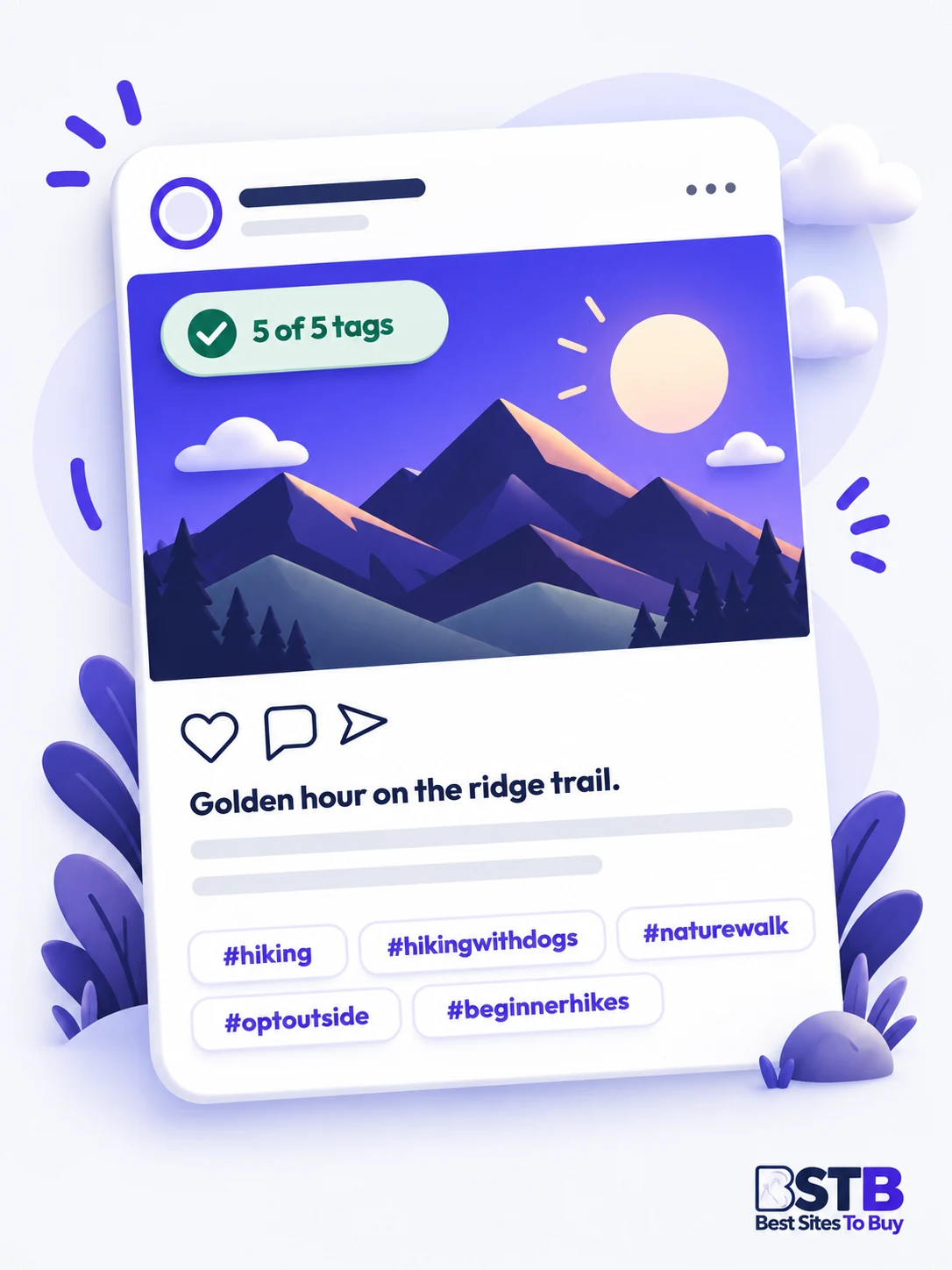
Use up to five hashtags per Instagram post, because Instagram announced a five-hashtag limit in December 2025 that replaces the old allowance of 30 and is rolling out gradually. Some accounts may still be able to add more for now, but planning around five keeps you safe as the change reaches everyone.
The limit also applies to Reels, and hashtags you add in a comment count toward the same total for that post. The old trick of hiding a block of 30 tags in the first comment no longer gives you extra room.
Fewer hashtag slots make each choice matter more for every post you publish. Instead of covering every possible audience, pick the five tags that describe the post most accurately. That is why this Instagram hashtag generator includes a live counter that turns amber when you select more than five, and a Build a 5-tag mix button that picks one popular, two niche, one related and one long-tail tag for you.
- 1 popular tagNames the broad category so Instagram knows the subject, such as #fitness.
- 2 niche tagsReach the smaller community that cares most about the topic, such as #homeworkout.
- 1 related tagAdds useful context from a neighbouring subject your audience follows, such as #mealprep.
- 1 long-tail tagDescribes the exact angle of the post in a few words, such as #beginnerworkout.
Swap any slot for a branded or location tag when it fits the post better.
Types of Instagram Hashtags
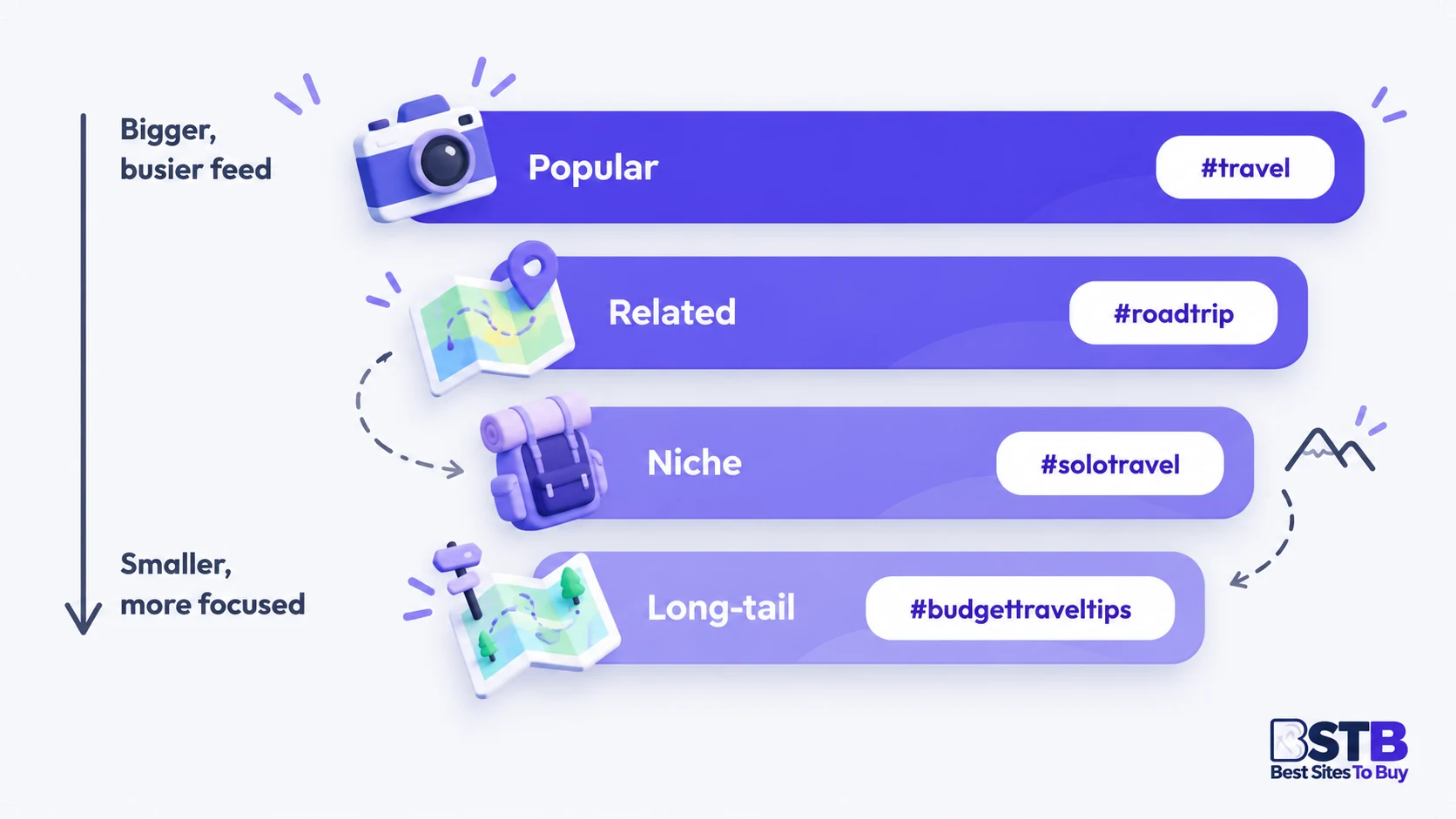
Instagram hashtags fall into nine practical types, and a strong set usually mixes two or three of them in one post. This Instagram hashtag generator creates popular, niche, related and long-tail hashtags automatically, while branded, location, community, event and trending hashtags are ones you add yourself because only you know your brand, location or event.
Popular hashtags
Popular hashtags are broad, widely used tags such as #travel or #food that describe the category clearly. They are crowded, so one popular hashtag per post is usually enough.
Niche hashtags
Niche hashtags are tags used by a specific community, such as #solotravel or #homebaker. They are the backbone of a good set because they match what interested people follow and search.
Related hashtags
Related hashtags cover neighbouring topics that share an audience with yours, such as #roadtrip for a travel post. Use a related hashtag only when it genuinely describes part of the content.
Long-tail hashtags
Long-tail hashtags are longer, multi-word tags such as #budgettraveltips that describe one exact angle. They help your post stand out in a smaller, more focused space.
Branded hashtags
Branded hashtags are tags unique to your business or campaign, such as your brand name plus a word. A branded hashtag gathers your posts and customer content in one place.
Location hashtags
Location hashtags name the city, neighbourhood or venue behind a post, such as #mumbaifoodie. They are especially useful for local businesses, restaurants, salons and event venues that serve nearby customers.
Community hashtags
Community hashtags are tags a group uses to connect, often ending in “community” or “ofinstagram”. Check that the community behind a hashtag is active and friendly before joining in.
Event and seasonal hashtags
Event and seasonal hashtags are tied to a date, festival or campaign, such as #diwalidecor. They work for a short window, so swap them out once the moment passes.
Trending hashtags
Trending hashtags are tags that are suddenly popular across Instagram right now. Only use a trending hashtag if your post is truly about that topic, otherwise it attracts viewers who quickly scroll past.
How to Choose the Right Instagram Hashtags
Choose relevant hashtags that describe your post accurately and that your target audience actually uses. A good hashtag tells Instagram and its users exactly what a post is about. With only five hashtag slots per post, these guidelines help you turn a list of Instagram hashtag ideas into a set that fits.

Use only relevant hashtags
Use a hashtag only if it describes what is actually in the post you are publishing. A popular tag that does not match your content brings the wrong viewers, and it can make an account look spammy.
Lean on niche hashtags
Niche and long-tail hashtags reach smaller groups who care about your exact subject, while broad tags are crowded. A place in a focused community is usually worth more than a brief moment in a giant feed.
Pick hashtags your audience searches
Pick hashtags by asking what your ideal follower would type into Instagram search for this post. A beginner looks for #beginnerworkout, not #hypertrophytraining, so match their words, not industry jargon.
Check each hashtag in the app
Search every hashtag in the Instagram app before you add it to a caption. Look at the top posts to confirm the tag is active, on topic and free of spam, and that your post would fit in.
Use Explore for hashtag ideas
Instagram search suggestions and the Explore page show the phrases people are looking for right now. Feed those words back into the generator to find matching hashtag suggestions for your post.
Learn hashtags from your niche
Learn hashtags from your niche by noticing which tags respected creators and competitors in your space use on posts like yours. Borrow the idea, not the whole list, and keep your set specific to your content.
Instagram Hashtag Best Practices
Instagram hashtag best practices come down to three habits: put hashtags at the end of your caption, capitalise each word in long tags and choose a different set for every post. The six practices below also cover captions, formats and spammy hashtags so your tags keep working over time.

Put hashtags at the end of your caption
Put hashtags at the end of your caption, after the message, so the first line stays free for your hook. Tags scattered through a sentence are harder to read, and screen readers announce each one, which interrupts the message. Keep the opening line of a Reel or post caption free of hashtags so the hook is the first thing people see.
Capitalise each word in long hashtags
Writing #BudgetTravelTips instead of #budgettraveltips makes the tag easier for everyone to read and helps screen readers pronounce the separate words. Hashtags are not case-sensitive, so the tag still works the same way.
Choose different hashtags for every post
Instagram's community guidelines ask people not to post repetitive content, and pasting the same block on every post looks automated. Keep a few core tags per content theme and swap the rest based on what each post shows.
Write a caption that supports your hashtags
Instagram looks at your caption, not just your hashtags, to understand a post. Use your main keywords naturally in the first lines, then let hashtags add context the caption does not already cover.
Use hashtags across formats
Use hashtags in the caption of feed posts, carousels and Reels, and use the hashtag sticker in Stories. The same rule applies to every format: a few accurate tags beat a long list.
Avoid restricted and spammy hashtags
Some hashtags are restricted by Instagram because of misuse, and engagement-bait tags such as follow-for-follow attract low-quality attention. If a tag's page shows few recent posts or a warning, leave it out.
Instagram Hashtag Examples by Niche
Instagram hashtag examples work best as five-tag sets that follow the one-popular, two-niche, one-related, one-long-tail mix this generator uses. Treat the eight sets below as starting points, then run your own topic through the Instagram hashtag generator above to get ideas tailored to your post.

| Niche | Example 5-tag set | Good for |
|---|---|---|
| Fitness | #fitness #homeworkout #strengthtraining #fitnesstips #beginnerworkout | Workout demos and routines |
| Travel photography | #travelphotography #solotravel #landscapephotography #travelinspiration #travelphotographytips | Destination shots and guides |
| Food blogger | #foodblogger #homecooking #easyrecipes #comfortfood #weeknightdinner | Recipes and cooking Reels |
| Wedding photography | #weddingphotography #weddingphotographer #destinationwedding #engagementphotos #weddingplanningtips | Portfolio and client stories |
| Digital marketing | #digitalmarketing #marketingstrategy #instagrammarketing #contentstrategy #socialmediamarketingtips | Tips carousels and tutorials |
| Small business | #smallbusiness #shopsmall #supportsmallbusiness #businesstips #smallbusinesstips | Product launches and behind the scenes |
| Fashion | #fashion #slowfashion #capsulewardrobe #outfitinspiration #everydayoutfits | Outfit posts and styling ideas |
| Dogs and pets | #dogsofinstagram #rescuedog #dogtraining #petlover #dogtrainingtips | Pet accounts and trainers |
Add a branded or location tag in place of one slot when it describes the post better, and always search each tag in Instagram before posting.
How to Tell if Your Instagram Hashtags Are Working
Your Instagram hashtags are working when posts that use them show rising reach, saves, shares and follows compared with similar posts that use a different set. Instagram's built-in Insights, available on professional accounts, show how many accounts each post reached and the engagement it received. Over a few weeks, patterns appear that no generator can predict for you.
Change one thing at a time so you can see what made the difference. If you swap hashtags, captions and posting time all at once, you will not know which change helped. Keep the content style steady and test two or three different hashtag sets on similar posts.
Hashtags are a small lever compared with the quality of the post itself. Strong content, a clear caption and consistent posting usually move reach and engagement more than any tag. Use your results to refine your hashtag strategy, and keep relevance as the deciding factor even when a tag looks popular.
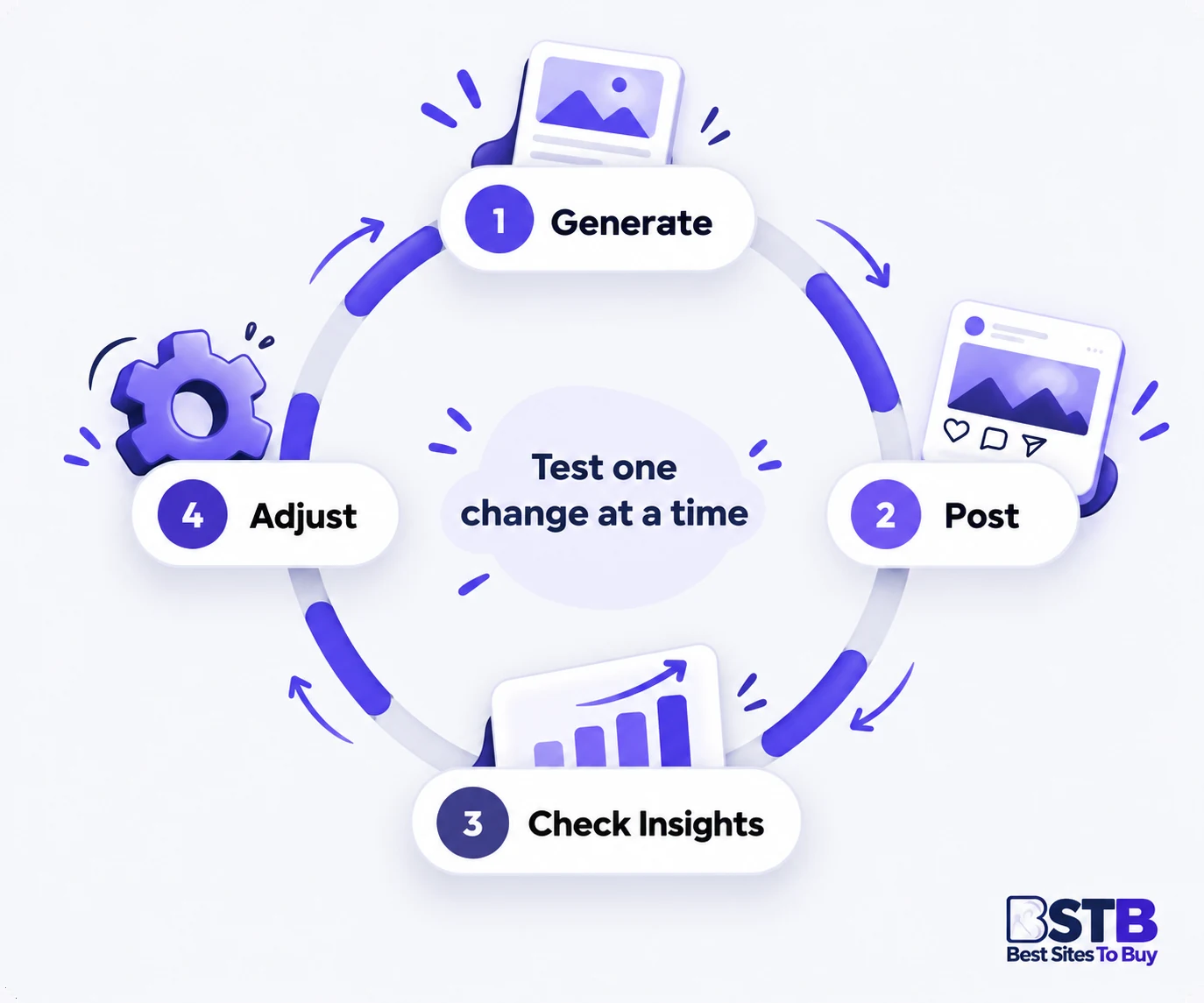
- Reach: shows how many unique accounts saw the post, and rising reach on niche-heavy hashtag sets is a good sign.
- Engagement: counts likes, comments, saves and shares, and strong saves and shares show the post reached the right audience.
- Profile visits and follows: show whether new viewers who found the post through hashtags liked what they saw.
- Where views came from: where Insights breaks this down, check how much came from people who do not follow you yet.
- Notes: keep a simple log of which set you used on each post so you can compare later.
Common Instagram Hashtag Mistakes
The most common Instagram hashtag mistakes are using only giant tags, adding unrelated trends, copying the same block and going over the five-hashtag limit. Avoid the six mistakes below and your hashtags will describe each post accurately to the people who care about it.

Only using giant hashtags
A set made entirely of the biggest hashtags puts your post in the most crowded feeds, where it disappears within minutes. Mix in niche and long-tail hashtags so the post reaches smaller, interested communities.
Adding unrelated trending hashtags
Jumping on a trending hashtag that has nothing to do with your post brings the wrong people to it. Those viewers scroll straight past, which does nothing to help the post or your account.
Copying the same hashtag block
Reusing one hashtag list on every post looks automated and ignores what each post is actually about. Generate a fresh, specific hashtag set for each piece of content you publish.
Going over the hashtag limit
With Instagram moving to five hashtags per post, any extra tags may be refused or ignored. Pick your best five hashtags instead of hoping that a long list still works.
Never checking a hashtag first
A hashtag can mean something different from what you expect, or its page can be full of spam. One quick search in the Instagram app before posting avoids these awkward surprises.
Hashtags instead of a caption
A post with a weak caption and a wall of hashtags gives people no reason to stop scrolling. Lead with a strong first line, then add your hashtags at the end of the caption.
Who Is This Instagram Hashtag Generator For?
This Instagram hashtag generator is built for creators, small businesses, social media managers, photographers and educators who post regularly and want relevant hashtags without hours of research. It needs no account, so you can use it as often as you like for every post you plan.

Hashtags for creators and influencers
Creators and influencers can find niche hashtags that match each post and keep their sets fresh across a busy posting schedule.
Hashtags for small businesses
Small businesses can turn a product description into relevant hashtags, then add their own branded and location hashtags.
Hashtags for social media managers
Social media managers can build hashtag sets for several clients quickly and copy them straight into scheduling notes.
Hashtags for photographers and artists
Photographers and artists can describe the style, subject and location of their work to reach the right hashtag community.
Hashtags for bloggers and educators
Bloggers and educators can paste a caption for a tip or tutorial and pick long-tail hashtags that describe the lesson.
Instagram Hashtag Generator FAQs
These Instagram hashtag generator FAQs give direct answers about how the tool works, Instagram’s five-hashtag rule and how to choose hashtags that fit your posts.
What is an Instagram hashtag generator?
An Instagram hashtag generator turns a keyword, topic or caption into ready-to-use hashtag ideas, so you can build a relevant set for a post in seconds.
Instead of searching tag by tag in the app, you describe your post once and get a structured list to choose from. This tool goes a step further by sorting every suggestion by purpose, which makes it easier to build a balanced set rather than a pile of the biggest tags you can think of.
- Input: a single keyword such as “fitness”, several keywords separated by commas, or the full caption you plan to post.
- Output: hashtags grouped into popular, niche, related and long-tail suggestions, each with its own copy button.
- Selection tools: Select All, Clear Selection, a live counter and a Build a 5-tag mix button that picks a balanced set.
- Your part: keep only the tags that genuinely describe the post, then copy them into your caption.
It speeds up hashtag research, but the final choice of tags should always be yours.
How does this Instagram hashtag generator work?
This generator matches the keywords in your text against a built-in library of 61 topics, then builds, filters and groups hashtag suggestions inside your browser.
The whole process runs on your device in a fraction of a second, which is why results appear as soon as you press the button. Because it works from your own words and a curated library, the suggestions stay close to what your post is actually about.
- Clean: punctuation, links, @mentions and filler words such as “the” or “today” are removed, and everything is lowercased.
- Match: your keywords are compared with topics ranging from travel, food and fitness to real estate, gaming and festivals.
- Build: your own keywords are joined into hashtags and given sensible endings such as “tips” or “ideas”, alongside matching community tags.
- Filter and group: duplicates are dropped, no single root word may fill a group, and results are sorted into four groups.
It does not connect to Instagram, so it shows no post counts, search volume or popularity figures.
Is this Instagram hashtag generator free?
Yes, this Instagram hashtag generator is completely free and needs no account, email address, payment or usage cap to generate and copy hashtags.
There is no trial period, no locked premium tier and no limit on how many times you can generate hashtags in a day. Every feature on the page, from the 5-tag mix to Copy All, is available to everyone.
- Unlimited use: generate, regenerate and copy as many hashtag sets as you need for every post you plan.
- Any device: it works in modern phone, tablet and desktop browsers, with buttons sized for easy tapping.
- No sign-up: open the page, type your topic and start choosing tags straight away.
- Every feature included: grouped results, the live counter, the 5-tag mix and every copy option are available to all.
Bookmark the page so it is ready whenever you plan your next post.
Does this hashtag generator use AI?
No, this hashtag generator uses transparent rules and a curated topic library instead of an AI model, which keeps results instant, consistent and private.
Many hashtag tools describe themselves as AI-powered or claim to track live trends. This one takes a simpler approach on purpose: it can explain exactly why each suggestion appears, and it never invents trends or numbers it cannot see.
- Speed: results appear immediately because nothing has to be sent to a server and processed.
- Privacy: your captions and keywords never leave your browser, so unpublished posts stay private.
- Consistency: the same input gives a predictable starting set, which makes it easy to compare options.
- Variety on demand: Generate Again brings in fresh suggestions for the same topic whenever you want new ideas.
Every suggestion starts from your own words rather than from invented trends.
How many hashtags should I use on Instagram?
Use up to five hashtags per post, because Instagram announced a five-hashtag limit in December 2025 and has been rolling it out gradually across accounts.
The old allowance of 30 hashtags encouraged long, generic blocks of tags. The new limit pushes everyone toward a few accurate tags, and some accounts may still be able to add more while the change rolls out. Planning around five keeps your posts ready for the limit wherever your account is in the rollout.
- Feed posts and carousels: choose your best five tags for each post rather than a long list.
- Reels: the same five-hashtag limit applies to Reels captions, so plan your best five tags there too.
- Comments: hashtags added in a comment count toward the same per-post total, so they do not add extra room.
- Quality first: five accurate, specific tags tell Instagram more about a post than a long, generic list.
The counter on this page turns amber as soon as your selection goes past five.
Should I use popular or niche hashtags?
Use mostly niche hashtags with one popular tag, because niche tags reach smaller, interested communities while popular tags compete in crowded feeds.
A popular tag such as #travel describes the category clearly, but new posts appear there constantly, so any single post can be quickly buried. Niche and long-tail tags reach people who follow or search for a specific subject, which usually makes them more useful for the space you have.
- 1 popular tag: names the broad category of the post so the topic is unmistakable.
- 2 niche tags: reach the communities most likely to care about the content.
- 1 related tag: adds useful context from a neighbouring subject your audience also follows.
- 1 long-tail tag: describes the exact angle, such as a tip, format or audience.
The Build a 5-tag mix button selects exactly this balance for you in one click.
What are niche hashtags?
Niche hashtags are tags used by a specific community inside a broader topic, such as #solotravel within travel, and they connect posts with people interested in that exact subject.
Niche hashtags sit between broad category tags and very specific long-tail tags in size and focus. Because the people who browse them already care about the subject, a niche tag is often the best way to reach an audience that will actually engage with your post.
- Fewer competing posts: niche tags are less crowded than broad tags such as #fitness or #food.
- Higher relevance: people browsing them are already interested in the subject, not just scrolling.
- Community feel: many niche tags have regular contributors who comment on and share each other’s posts.
- Examples: good niche hashtags include #homeworkout within fitness, #homebaker within baking and #weddingphotographer within weddings.
Look in the Niche group of your results for ready-made options for your topic.
How do I find hashtags for my niche?
Find niche hashtags by entering a specific description of your post into the generator, then checking each suggestion in Instagram search before you use it.
The more precisely you describe the post, the more precise the suggestions become. Checking each tag in the app afterwards confirms it is active, on topic and a good home for your content.
- Be specific: “vegan meal prep for students” gives far better tags than “food”.
- Check the tag page: open each hashtag in Instagram and confirm that recent posts match your content and quality.
- Watch your space: note which tags respected creators and competitors in your niche use on posts like yours.
- Use Explore suggestions: the search suggestions in Instagram show the phrases people look for, which you can feed back into the generator.
Repeat the process for each post rather than reusing one fixed list.
Where should I put hashtags on Instagram?
Put hashtags at the end of your caption, because it keeps the first line free for your hook and makes the caption easier for screen readers.
The first line of a caption is often all people see before tapping to read more, so it should carry your message, not a string of tags. Grouping hashtags at the end keeps the caption readable for everyone, including people who use assistive technology.
- Not in the first line: lead with your hook or key message, especially on Reels.
- Capitalise each word: #BudgetTravelTips is easier to read, and easier for screen readers to pronounce, than #budgettraveltips.
- Leave a gap: a line break between your caption and your hashtags makes both easier to scan.
- No comment loophole: tags placed in a comment count toward the same per-post limit.
Copy Selected gives you a clean block to paste at the end of any caption.
Can I generate hashtags from an Instagram caption?
Yes, paste your full caption and the generator extracts its most meaningful words, ignoring filler words, links and @mentions, to build matching hashtag ideas.
Captions often contain the clearest description of a post, so they make a good starting point. The generator scores each word by how important it seems and then builds suggestions from the strongest ones.
- Existing hashtags: any tags already in your caption are treated as strong keywords.
- Repeated words: words you use more than once get extra weight, since they usually describe the main topic.
- Phrases: common two-word topics such as “wedding photography” are kept together as one hashtag idea.
- Emojis and symbols: are ignored, so they do not change your results.
Long captions work best when the main topic is stated clearly at least once.
Can I use the same hashtags on every post?
No, avoid one fixed hashtag list, because Instagram’s community guidelines discourage repetitive content and a fixed list ignores what each post actually shows.
Pasting the same block under every post can look automated, and it means many of your tags will not describe the content they sit under. Tailoring each set keeps your hashtags accurate and gives you a better sense of which ones help.
- Keep a small core: reuse two or three tags that always describe your account or content theme.
- Rotate the rest: choose fresh, specific tags that match what each post shows.
- Use Generate Again: get new suggestions for the same topic without starting from scratch.
- Group by theme: keep a short list of tags for each content pillar, such as tutorials or behind the scenes.
Tailored sets also make it easier to see which tags work for your audience.
Do hashtags work on Instagram Reels and Stories?
Yes, hashtags work on Reels through the caption and on Stories through the hashtag sticker, and the five-tag limit applies to Reels as well.
The way you add tags changes slightly between formats, but the rule stays the same: a few accurate tags work better than many loose ones. Mentioning the format in the generator, such as “Reel tutorial”, helps you spot tags that suit it.
- Reels: add your tags at the end of the caption, after a strong opening line.
- Stories: use the hashtag sticker, or type the tag with the text tool.
- Carousels: treat them like any other feed post and tag the overall topic.
- Highlights: do not need hashtags, but clear titles help visitors find your best Stories.
Whatever the format, choose tags that describe what viewers will actually see.
Are generated hashtags guaranteed to increase reach?
No, generated hashtags cannot guarantee more reach, because reach depends mainly on your content, your audience and how people respond to each post.
Hashtags are only one signal among the many that Instagram uses to decide who sees a post. They help Instagram and its users understand what a post is about, but they cannot make an unengaging post perform well, and no tool can promise a result.
- Hashtags describe: they help Instagram categorise your post and show it to people interested in the topic.
- Content decides: how people react to the post matters far more than any single tag.
- Consistency helps: posting regularly gives you more chances to learn what your audience likes.
- No live data here: this tool shows no popularity figures and makes no promises about performance.
Use the tool for well-organised ideas, then judge the results in Insights.
How do I know if my hashtags are working?
Check Instagram Insights on a professional account and compare reach, saves, shares and follows across posts that use different hashtag sets.
A single post rarely tells you much, so look for patterns over several weeks. Keeping everything else similar while you change the hashtags makes it much easier to see what made the difference.
- Change one thing: keep your content style, caption length and posting time steady while you test tags.
- Log your sets: write down which hashtags each post used so you can compare later.
- Watch the right numbers: reach, saves, shares and new follows show whether new viewers found and liked the post.
- Give it time: compare results across several weeks rather than judging one post.
Keep relevance as the deciding factor for every hashtag, even when the numbers vary from post to post.
What are banned or restricted hashtags?
Banned or restricted hashtags are tags Instagram limits after misuse, so their pages show few recent posts or a notice, and using them can make a post look spammy.
Even ordinary-looking words can become restricted hashtags if enough people have misused them on Instagram. Checking a tag before you post takes a few seconds and avoids attaching your content to a page that Instagram has limited.
- How to spot them: search the tag and look for missing recent posts or a warning message.
- Engagement bait: skip tags such as follow-for-follow or like-for-like, which attract low-quality attention.
- Off-topic tags: unrelated tags can make a post look spammy even when they are not restricted.
- Check each time: a tag’s status can change, so recheck tags you have not used for a while.
When in doubt, leave the tag out and pick a clearer alternative.
Can I use this hashtag generator for TikTok or other platforms?
Yes, the hashtag ideas suit most platforms, but each app sets its own rules, so check the current hashtag guidance for TikTok, X or LinkedIn before posting.
The research behind a good hashtag is the same everywhere: describe the content accurately and reach the people who care about it. What changes between platforms is how many tags are allowed and how audiences use them.
- Same research: relevant, specific tags help people find your content on every platform.
- Different limits: each app allows a different number of hashtags, and limits can change.
- Different habits: some audiences use fewer tags or prefer different wording for the same topic.
- Adapt the set: keep the core idea, then adjust a tag or two to suit each platform.
A focused five-tag set is a sensible starting point on any platform.
Does the hashtag generator store or send what I type?
No, the generator runs entirely in your browser, so your keywords and captions are never sent to a server or saved by this page.
Everything happens on your own device, from reading your text to building the suggestions. That makes the tool safe to use for posts you have not published yet, including client work and product launches.
- No account: nothing links the text you type to you or your profile.
- Reset clears everything: pressing Reset removes the input box text and all hashtag results instantly.
- Nothing persists: reloading or leaving the page clears your text and suggestions.
- Your choices stay yours: the generator itself does not record which hashtags you select or copy.
You can safely paste client captions and posts you have not published yet into the generator.
Make Your Instagram Post Stand Out Beyond Hashtags
Hashtags are only one part of a strong Instagram post, so finish the job with the rest of our free tools. Style a headline or bio line with our free Instagram Fonts Generator, or browse our independent reviews of AI tools for writing captions and producing social content.