
Instagram Fonts Generator
This free Instagram fonts generator turns your text into 37 fancy Instagram fonts the moment you type, from bold and cursive to gothic and bubble letters. Tap Copy on the style you like and paste it into your Instagram bio, name, captions, comments or Stories.
- 100% free
- One-tap copy
- Keeps your emojis
- Nothing sent to a server
These are Unicode text styles, not font files. Each letter is swapped for a look-alike Unicode character, so the style stays when you paste it into Instagram or any other app that supports Unicode. Emojis, punctuation and characters without a styled version stay unchanged.
Showing a sample. Start typing above to style your own text.
Instagram Fonts Generator
This free Instagram fonts generator turns plain text into 37 copy-and-paste text styles as you type, so you can give your bio, name, captions and comments a distinctive look in seconds. Every style updates live, which lets you compare bold, cursive, gothic, bubble and decorative versions side by side before you pick one.
Instagram does not let you choose a font for your profile or captions, so every Instagram font changer works the same way: what looks like a different font is really a different set of characters. This Instagram fonts generator swaps each letter for a matching character from the Unicode standard, the shared character set that phones and computers already use for text. Because the result is real text rather than an image, it pastes straight into Instagram and keeps its style.
Unlike a basic Instagram text generator that shows one long list, the styles here are organised into nine categories with a search box on top, so you can jump straight to cursive, bubble or gothic letters instead of scrolling through a long list. Each result has its own Copy button, and on a phone you can simply tap the styled text to copy it.
Bold and italic fonts
Bold and italic Instagram fonts make a name, headline or keyword stand out without losing readability.
Cursive script fonts
Cursive script fonts use handwriting-style letters to give bios and captions a softer, more personal feel.
Gothic Old English fonts
Gothic Old English fonts use blackletter characters for bold, dramatic or vintage Instagram aesthetics.
Bubble letter fonts
Bubble letter fonts use circled and boxed letters that work well for short labels and Highlight titles.

Why use an Instagram font changer?
Stand out with fancy fonts
A styled name or headline catches the eye when most profiles use plain text.
Build a recognisable font style
Reusing one or two styles across your bio, Highlights and captions makes your profile feel consistent.
Organise your bio with fonts
A bold line for your niche and plain text for details make a short bio easier to scan.
No font design skills needed
There is nothing to install, no app to download and no image editing involved.
Fonts that work beyond Instagram
The same Unicode text pastes into most apps that support it, such as TikTok, Facebook and X.
How Do Instagram Fonts Work?
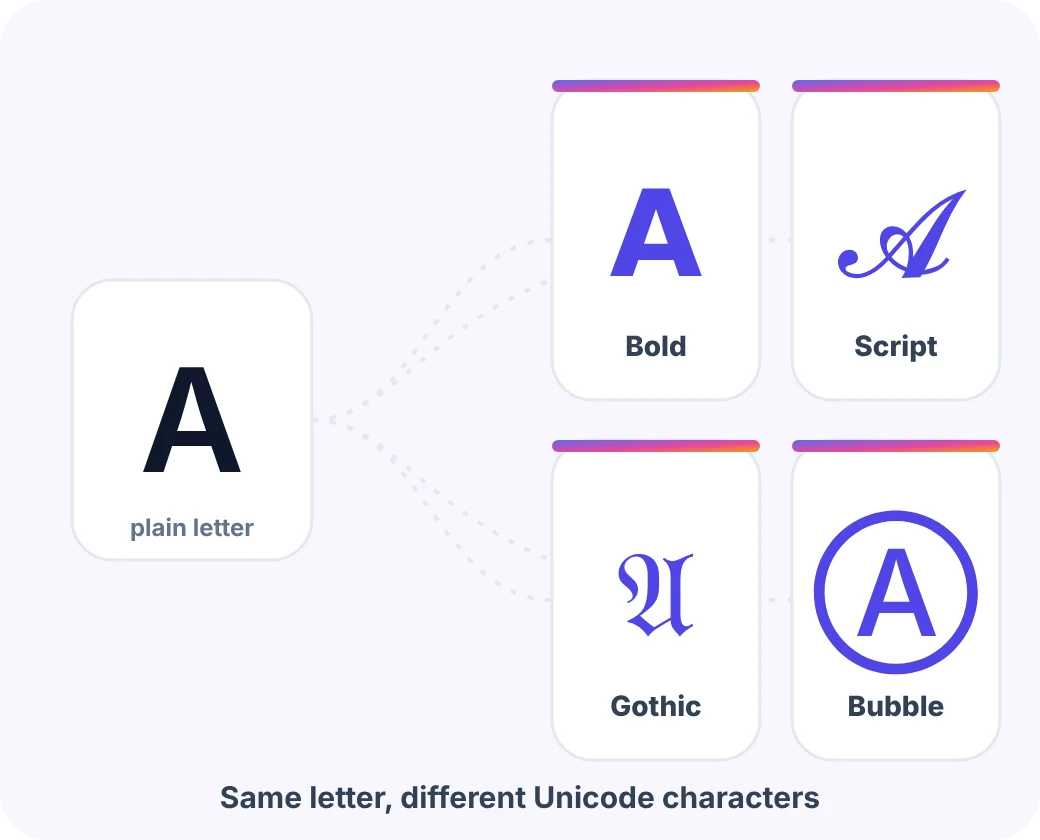
Instagram fonts work by replacing each normal letter with a look-alike Unicode character, such as the mathematical bold “𝗔” in place of a plain “A”. Unicode includes complete alphabets of styled letters that were originally added for maths and technical writing, along with circled, squared and other decorative characters.
Because these are characters, not fonts, the style travels with the text. When you copy 𝓗𝓮𝓵𝓵𝓸 and paste it into your bio, Instagram stores the same special characters you copied, and every phone that has a font for them shows the same shapes.
The Instagram font generator does this conversion in your browser the moment you type. It only changes the letters A to Z and, for some styles, the numbers 0 to 9. Emojis, punctuation and characters that have no styled version are left exactly as they are, so your message never gets scrambled.
- Not a real font: nothing is installed on your phone or on Instagram; only the characters change.
- Survives copy and paste: the styled characters are ordinary text, so they paste like any other words.
- Accents are kept: a word like Café keeps its accent on top of the styled letter.
- Device fonts decide the look: each phone draws the characters with its own fonts, so shapes can differ slightly.
How to Use the Instagram Font Generator
Use the Instagram font generator in five quick steps: type your text, browse the styles, tap Copy, open Instagram and paste the styled text where you want it. Each step takes seconds, and the shortcuts below make the whole copy and paste job even faster.
- Step 01
Type your text into the font generator
Enter your name, bio line, caption or comment in the box, and any emojis you add will stay unchanged.
- Step 02
Browse the font styles
All 37 font styles update instantly, and you can filter them by category or search for a style by name.
- Step 03
Tap Copy on a font
Press Copy on the font you like, or tap the styled text itself, and wait for the “Copied!” message to appear.
- Step 04
Open Instagram to use the font
Go to Edit profile for your name or bio, or start a new post, comment or Story in Instagram.
- Step 05
Paste the font and save
Paste the styled text, check that it looks right on your screen, then save your profile or publish the post.

Font Generator Shortcuts That Save Time
This Instagram font generator is built for quick, repeated use on a phone or desktop. You can try several looks for the same line without retyping anything, because every style updates as soon as you change the text.
If you are styling a full bio, convert one line at a time. That way you can give your name or headline a stronger style and keep the details in plain text, which is easier to read.
- Search by everyday words: try “cursive”, “old english”, “outline” or “tiny” to find a style fast.
- Use the categories: jump to Bold, Script, Gothic, Bubble or Decorative with one tap.
- Copy All for comparisons: copy every visible style, labelled by name, and paste them into your notes to compare.
- Edit without scrolling: on long lists, the floating Edit text button takes you straight back to the input box.
- Try the examples: the sample buttons under the box show how emojis and symbols behave.
Instagram Font Categories Explained
The 37 styles in this Instagram fonts generator are grouped into nine categories: Popular, Fancy, Bold, Italic, Script, Gothic, Bubble, Decorative and More Fonts, and each category suits a different job. Some styles appear in more than one category, so the counts below add up to more than 37.

| Category | Sample | What it includes | Best for |
|---|---|---|---|
| Popular 9 | 𝗕𝗼𝗹𝗱 · 𝓒𝓾𝓻𝓼𝓲𝓿𝓮 | The most-copied styles in one place: bold, cursive, italic, gothic, outline, small caps, bubble and monospace. | Names, bio headlines and quick picks |
| Fancy 8 | 𝕆𝕦𝕥𝕝𝕚𝕟𝕖 · ꜱᴍᴀʟʟ ᴄᴀᴘꜱ | Distinctive looks such as double-struck outlines, small caps, tiny text and wide aesthetic spacing. | Aesthetic and moodboard accounts |
| Bold 5 | 𝗦𝘁𝗿𝗼𝗻𝗴 | Heavier letters in sans and serif forms, including bold italic and bold gothic. | Offers, announcements and first lines |
| Italic 4 | 𝘚𝘭𝘢𝘯𝘵𝘦𝘥 | Light, slanted letters that read like an editorial pull quote. | Quotes, credits and mood lines |
| Script 4 | 𝒮𝒸𝓇𝒾𝓅𝓉 | Handwriting-style letters in regular and bold weights, plus sparkle and heart frames. | Personal names, weddings and beauty |
| Gothic 3 | 𝔊𝔬𝔱𝔥𝔦𝔠 | Blackletter or Old English characters, including a bold version and a framed title style. | Music, gaming and vintage themes |
| Bubble 5 | ⓑⓤⓑⓑⓛⓔ | Circled, filled, squared and bracketed letters with a playful, sticker-like shape. | Short labels and Highlight titles |
| Decorative 12 | ꧁༺ 𝓡𝓸𝔂𝓪𝓵 ༻꧂ | Frames, wings, stars and line effects such as strikethrough and underline wrapped around your text. | Headers and special announcements |
| More Fonts 11 | 𝙼𝚘𝚗𝚘 · uʍop ǝpısdn | Monospace, upside-down, currency, spaced-out and other novelty styles. | Fun comments and one-off posts |
Samples are shown with your device’s fonts, so they may look slightly different on another phone.
Where You Can Use Fancy Instagram Fonts
You can use fancy Instagram fonts almost anywhere Instagram lets you type freely, including your bio, display name, captions, comments, Stories and Highlight titles. The most popular place is the bio, where a styled name or tagline helps a profile stand out at a glance, which is why Instagram bio fonts are the most popular use for this tool.
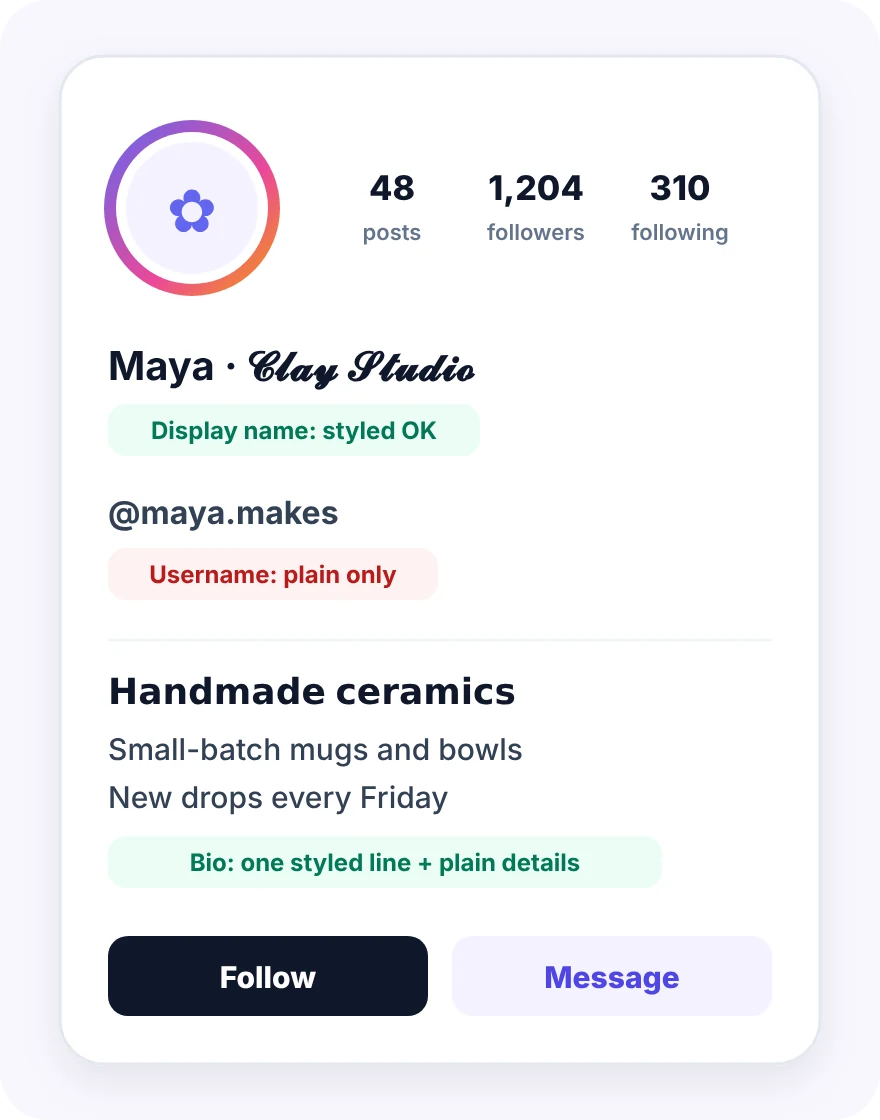
The one place fancy Instagram fonts never work is your username, also called your @handle. Instagram usernames only accept plain letters, numbers, periods and underscores, so styled characters will not work there. Keep fancy text for your display name and the rest of your profile.
- Bio: style a tagline, a list of interests or a call to action.
- Display name: add a styled word next to your plain name so people can still find you.
- Captions: highlight a headline or the first line of a post with a readable font.
- Comments and DMs: add personality to short replies with a single styled word or phrase.
- Stories and Highlights: paste styled text into the text tool or Highlight titles.
- Notes: short styled phrases suit Instagram Notes well, because only a few words fit there.
- Other apps: TikTok, Facebook, X, WhatsApp, Discord and most apps that accept Unicode.
How to Change the Font in Your Instagram Bio
To change the font in your Instagram bio, style your text in this Instagram fonts generator, copy it, then paste it into the Bio field under Edit profile and save. The same steps work for your display name, which sits just above the bio.

- 01
Plan your bio font
Decide which line deserves a style, usually your name, niche or headline, and keep the rest plain.
- 02
Style and copy the font
Type that line into the generator, pick a readable style and tap Copy.
- 03
Edit your profile for the new font
In Instagram, open your profile, tap Edit profile and select the Bio or Name field.
- 04
Paste and check the font
Paste the styled line, add your plain text, save, then view your profile to check it.
Tip: keep your contact details, location and keywords in normal text, not fancy fonts. Search and screen readers may not recognise styled letters, so plain text keeps that information easy to find and read.
Instagram Bio Font Ideas by Niche
Match your font style to the feeling of your niche: bold styles for confidence, script styles for warmth, gothic styles for drama and clean styles for professional accounts. These Instagram bio fonts examples show one styled line per bio, which is usually all you need.

| Niche | Suggested style | Example bio line |
|---|---|---|
| Fitness coach | Bold Sans | 𝗧𝗿𝗮𝗶𝗻 𝘀𝗺𝗮𝗿𝘁𝗲𝗿, 𝗻𝗼𝘁 𝗵𝗮𝗿𝗱𝗲𝗿 |
| Wedding photographer | Cursive | 𝓒𝓪𝓹𝓽𝓾𝓻𝓲𝓷𝓰 𝓵𝓸𝓿𝓮 𝓼𝓽𝓸𝓻𝓲𝓮𝓼 |
| Beauty and skincare | Script | 𝒢𝓁ℴ𝓌 𝒻𝓇ℴ𝓂 𝓌𝒾𝓉𝒽𝒾𝓃 |
| Gaming and streaming | Bold Gothic | 𝕷𝖊𝖛𝖊𝖑 𝖚𝖕 𝖉𝖆𝖎𝖑𝖞 |
| Small business | Small Caps | ʜᴀɴᴅᴍᴀᴅᴇ ɪɴ ᴘᴜɴᴇ |
| Travel creator | Italic Sans | 𝘚𝘭𝘰𝘸 𝘵𝘳𝘢𝘷𝘦𝘭, 𝘣𝘪𝘨 𝘷𝘪𝘦𝘸𝘴 |
| Aesthetic account | Aesthetic Wide | soft days |
| Developer or tech | Monospace | 𝙱𝚞𝚒𝚕𝚍𝚒𝚗𝚐 𝚒𝚗 𝚙𝚞𝚋𝚕𝚒𝚌 |
Type your own line into the generator above to see it in all 37 styles, then pick the one that fits your profile.
Instagram Font Readability, Accessibility and Device Support
Instagram fonts display correctly on most modern phones, but fancy text can be harder to read, harder for screen readers to announce and harder to find in search. Knowing these three limits helps you use styled text only where it adds the most value.
Why some font letters show as boxes
Each phone, browser and app draws Unicode font characters with its own built-in fonts. If a phone, browser or app lacks a font for a rarer symbol, it shows an empty box instead. Bold, italic and script styles are the most widely supported, so they are the safest choice for important text.
How screen readers handle fancy fonts
Screen readers may read styled letters one by one, describe them as symbols or skip them altogether. Followers who rely on assistive technology may then miss your name or message, so keep key information in plain text.
Fancy fonts and search discovery
Search tools may not match a styled word to its plain spelling. If people search for your name or niche, make sure those words also appear in normal text somewhere in your profile.
Keep fancy font text short
Decorative font letters are slower to read than plain text, especially on small phone screens. A single styled line draws attention; a whole paragraph of fancy text pushes people away.
Tips for Readable Instagram Fonts That Still Stand Out
Keep Instagram fonts readable by using styled text for short accents, keeping the essentials in plain text and sticking to one or two signature styles. These habits keep your profile eye-catching without making it hard to read or find.

Use fonts on a few words, not everything
Use one style for a name, heading or keyword and keep the rest plain. Long blocks of styled text are tiring to read on a small screen.
Keep key details out of fancy fonts
Write your niche, location and contact details normally so search and screen readers can handle them.
Check your fonts on another device
Most phones display these symbols, but older devices may show empty boxes for rarer ones. Preview your bio from a second phone or browser if you can.
Pick fonts with full letter coverage
Bold, italic, script and gothic font styles cover every English letter in both cases. Bubble, squared and small caps styles turn lowercase into a single form, so check names that rely on capitals.
Match your fonts to your brand
Choose one or two styles and reuse them across your bio, Highlights and captions so your profile feels consistent rather than random.
Pair fonts with simple symbols
Small dividers such as · or | can separate the sections of a styled bio neatly, but use them sparingly so the layout stays clean and easy to scan.
Common Mistakes with Instagram Fonts
The most common Instagram font mistakes are mixing too many styles, styling your whole bio, hiding your name in symbols and trying to style your username. Avoid the six mistakes below and your fancy fonts will help your profile rather than hurt it.

Mixing too many fonts
Four different fonts in one Instagram bio look chaotic and make the profile hard to scan. Pick one accent font style and let plain text do the rest of the work.
Putting your whole bio in fancy fonts
A bio written entirely in fancy text is hard to read and may be unreadable to screen readers, so style one line at most.
Hiding your name in font symbols
If your display name is fully styled, people searching for you may not find it, so keep your real name in plain text.
Trying to use fonts in your username
Instagram usernames accept only letters, numbers, periods and underscores, so styled characters will be rejected.
Using rare font symbols for key text
Uncommon font characters may show as empty boxes on some phones, so use widely supported styles for anything important.
Using fonts to imitate verification
Avoid symbols that look like badges or official marks in your name. Keep your font styling decorative so that followers are never misled about who you are.
Who Is This Instagram Font Generator For?
This Instagram font generator is built for creators, small businesses, coaches, aesthetic accounts and social media managers who want stylish text without design software. It needs no account, so you can use it as often as you like for every profile you manage.

Fonts for creators and influencers
Creators and influencers can give their name and niche a signature font that followers recognise across posts and Highlights.
Fonts for small businesses
Small businesses can highlight offers, new drops and opening hours in captions while keeping contact details in plain text.
Fonts for coaches and personal brands
Coaches and personal brands can structure a bio like a mini landing page with one styled headline and clear details.
Fonts for aesthetic and fan accounts
Aesthetic and fan accounts can match their text to the mood of the feed with script, wide or bubble fonts.
Fonts for social media managers
Social media managers can prepare styled lines for several clients quickly and paste them straight into content plans.
Instagram Fonts Generator FAQs
These Instagram fonts generator FAQs give clear, direct answers about how fancy fonts work, where styled text works and how to keep it readable.
What is an Instagram fonts generator?
An Instagram fonts generator turns plain text into styled versions you can copy and paste into Instagram, by swapping each letter for a look-alike Unicode character.
You type your text once and see it in many styles at the same time, from bold and cursive to gothic and bubble letters. This tool shows 37 styles in nine categories and updates every one of them as you type, so choosing a look takes seconds.
- Input: a name, bio line, caption, comment or any short piece of text, emojis included.
- Output: 37 styled versions of your text, each with its own Copy button.
- Organisation: nine categories and a search box help you find the right style quickly.
- Result: real text you can paste into Instagram and most other apps.
It is the quickest way to give your profile a distinctive look without any design software.
Are Instagram fonts real fonts?
No, Instagram fonts are not real fonts; they are Unicode characters that look like styled letters, which is why they keep their style when copied and pasted.
Instagram does not let you upload or choose fonts for your bio or captions. Unicode, however, contains complete alphabets of bold, italic, script and other styled letters, mainly added for maths and technical writing. Using those special characters in your bio or captions creates the effect of a brand-new font.
- Nothing to install: no font files are added to your phone or to Instagram.
- Text, not images: the result can be selected, copied and edited like normal text.
- Shared standard: phones and computers already know how to display these characters.
- Looks can vary: each device draws the characters with its own fonts, so shapes may differ slightly.
Think of Instagram fonts as special letters you can copy rather than a new font you install.
How do I change the font in my Instagram bio?
To change the font in your Instagram bio, style your text in the generator, copy it, then paste it into the Bio field under Edit profile and save.
Instagram treats the styled characters like any other text, so the process is the same as editing your bio normally. Styling one line, such as your headline or niche, usually looks better than styling the whole bio.
- Style one line: type your headline into the generator and choose a readable style.
- Copy it: tap Copy, or tap the styled text, and wait for the “Copied!” message.
- Edit your profile: in Instagram, open your profile, tap Edit profile and select Bio.
- Paste and save: paste the line, add your plain-text details, then save and check your profile.
The same steps work for your display name, which sits just above your bio.
Can I use fancy fonts in my Instagram username?
No, Instagram usernames only accept plain letters, numbers, periods and underscores, so styled Unicode characters will not work in your @handle.
Your username is the unique handle people use to tag and search for you, so Instagram keeps it to a simple set of characters. Styled letters, emojis and decorative symbols are all rejected in the username field. Your display name is a different field and is far more flexible.
- Username: only plain letters, numbers, periods and underscores are allowed in your @handle.
- Display name: accepts styled characters, so you can add a fancy word there.
- Bio: the best place for styled text, as long as plain-text details sit alongside it.
- Best of both: keep your username simple and memorable, and express style elsewhere.
Use the generator for your name and bio, and keep your handle plain.
Can I use fancy fonts in my Instagram display name?
Yes, your Instagram display name accepts styled Unicode characters, but keep your real name in plain text so people can still find you in search.
The display name appears in bold at the top of your profile and next to your posts and comments, so it is a natural place for a little style. Because search may not match styled letters to plain words, fully styled names can be harder to find.
- Mix plain and styled: write your name normally and add one styled word or symbol.
- Choose readable styles: bold, italic and script styles are clearer than rare symbols.
- Keep it short: a long, decorated name is hard to read in comments and tags.
- Check how it looks: view your profile and a recent comment to see the name in context.
A small styled touch next to a plain name gives you style and searchability.
Do Instagram fonts work in captions, comments, Stories and Reels?
Yes, styled Unicode text works in captions, comments, Stories, Reels captions, Highlight titles and Notes, because Instagram treats it like ordinary text.
Wherever Instagram lets you type freely, you can paste styled font characters too. The main difference between places is how much space you have and how quickly people read, which affects how much styling makes sense.
- Captions: style a headline or first line, then keep the rest plain.
- Comments and DMs: a styled word or short phrase adds personality to replies.
- Stories and Reels: paste styled text into the text tool or the Reel caption.
- Highlights and Notes: short styled titles keep your profile organised and on-brand.
Short styled phrases work best everywhere; long styled paragraphs are hard to read.
Why do some Instagram font letters show as boxes or not change?
Some letters show as boxes because the viewer’s device lacks a font for that rare character, and some do not change because Unicode has no styled version of them.
Unicode includes styled versions of the basic Latin letters A to Z and, for some styles, the numbers 0 to 9. All other characters, including emojis and punctuation, stay unchanged on purpose so your message stays intact. Boxes appear when a phone or app cannot draw a particular symbol.
- Unchanged characters: punctuation, emojis and most non-Latin letters are kept as they are.
- Accented letters: the base letter is styled and the accent is kept on top.
- Boxes on some devices: older phones and some apps lack fonts for rarer symbols.
- Easy fix: switch to a widely supported style such as bold, italic or script.
When in doubt, check your text on a second device before posting.
Do Instagram fonts work on iPhone and Android?
Yes, most modern iPhones and Android phones display popular Instagram font styles correctly, although rarer symbols may look different or appear as boxes on older devices.
Font support depends on the fonts that each phone, browser or app has installed. Bold, italic, script and gothic letters are widely supported, while unusual decorative symbols are more likely to vary between phones, browsers and apps.
- iPhone: recent versions of iOS show all the common Instagram font styles well.
- Android: most current phones display them, but older versions may miss rare symbols.
- Desktop: modern browsers usually display the same Instagram font styles as phones do.
- Third-party apps: some apps use their own fonts, so check important text there too.
For anything important, use a widely supported style and preview it on another device.
Do fancy fonts affect accessibility or search?
Yes, they can: screen readers may read styled letters one by one or skip them, and search tools may not match styled words to their plain spelling.
Styled characters are technically different symbols from normal letters, so assistive technology and search do not always treat them as words. That does not mean you should avoid them, only that you should use them where they will not hide important information.
- Screen readers: may announce each styled letter separately or describe it as a symbol.
- Search: a styled name or keyword may not appear when people search for the plain word.
- Plain-text essentials: keep your name, niche, location and contact details in normal text.
- Short accents: use styled text for a headline or a single word, not whole paragraphs.
Used sparingly, styled text adds personality to your profile without shutting anyone out.
Do styled fonts hurt reach or engagement?
No tool can promise that styled fonts raise or lower reach; what is clear is that styled words may not match plain-text searches, so keep key words in normal text.
Fonts change how your text looks, not what Instagram shows to whom. A striking headline may encourage people to stop and read, while a hard-to-read bio may push them away, so readability matters more than the font itself.
- Attention: a single styled line can make a profile or caption stand out.
- Discovery: keywords written only in styled letters may be missed by search.
- Readability: clear font styles keep people reading, while cluttered fancy text loses them fast.
- Test it: compare profile visits and follows after a change, giving it a few weeks.
Treat fonts as a visual accent and let your content do the heavy lifting.
Which Instagram font is the most readable?
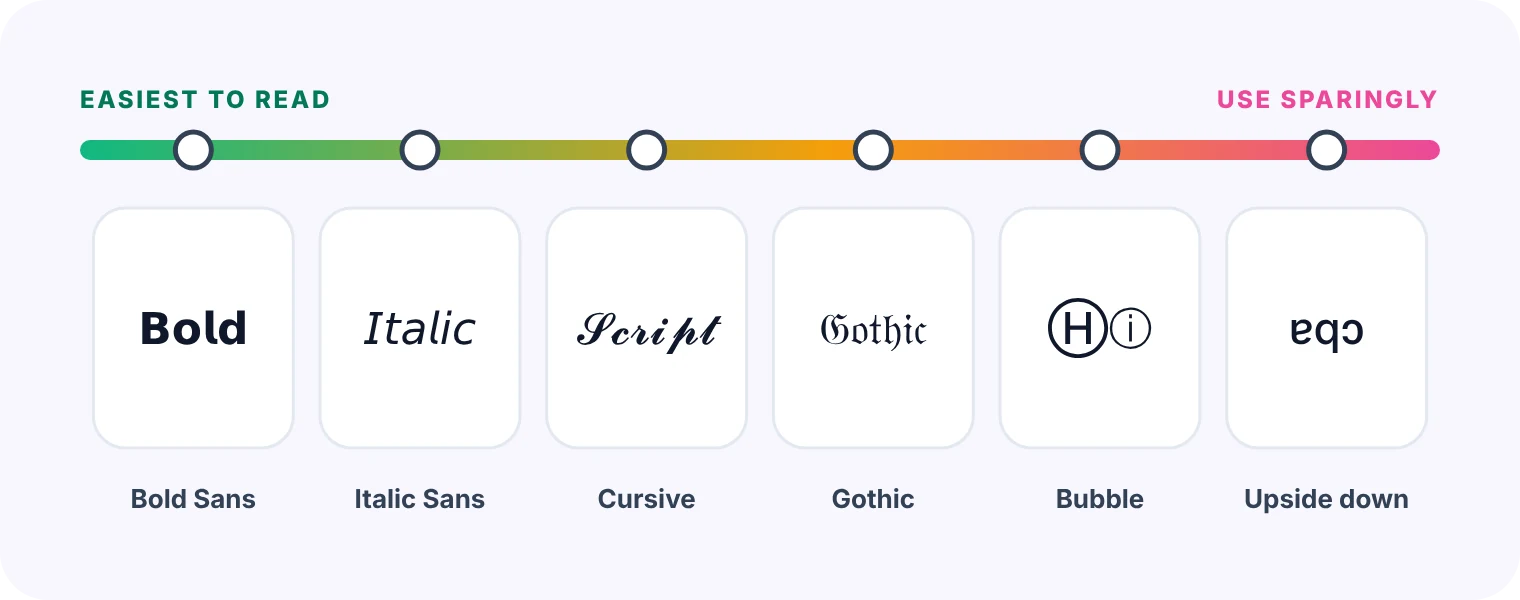
Bold sans, italic sans and clean script styles are usually the most readable Instagram fonts, because their letter shapes stay close to normal text.
Font readability matters most on small phone screens and for important information like names. Decorative styles such as gothic, bubble or upside-down text look great in short bursts but become hard to read in longer lines.
- Bold Sans: the clearest Instagram font choice for names, headlines and special offers.
- Italic Sans: a soft, readable font style for quotes, credits and short taglines.
- Cursive: an elegant font that stays legible for short names, greetings and phrases.
- Save for accents: gothic, bubble and decorative styles work best for one or two words.
If a friend cannot read it at a glance, choose a simpler style.
Can I use these fonts on TikTok, Facebook or other apps?
Yes, because the styles are Unicode text, you can paste them into most apps that accept Unicode, including TikTok, Facebook, X, Threads, WhatsApp and Discord.
The same styled characters work anywhere the app and the viewer’s device support them. Each platform has its own rules for names and handles, so check where styled text is allowed before you rely on it.
- Social profiles: bios and display names on many platforms accept styled text.
- Messaging apps: styled words work in most chats, group names and status messages.
- Handles and usernames: most platforms restrict these fields to plain letters, numbers and symbols.
- Different looks: each app and device may draw the characters slightly differently.
Create your styled text once here and reuse it across all of your profiles.
Can I mix fonts and emojis?
Yes, you can mix styled text and emojis freely; the generator keeps every emoji exactly as you typed it while styling the letters around it.
Emojis and simple symbols can frame a styled line nicely, for example a sparkle on each side of your name. Too many, though, make a bio cluttered and harder to read, especially alongside decorative letters.
- Emojis stay intact: skin tones, flags and combined emojis are all preserved exactly.
- Frames and dividers: a symbol on each side, or a · between sections, keeps things tidy.
- Decorative styles: some styles already add frames such as wings or stars around your text.
- Keep balance: one or two emojis per line usually looks cleaner than many.
Try the emoji examples under the text box to see how they combine.
Is this Instagram font generator free?
Yes, this Instagram font generator is completely free and needs no account, email address, payment or app download to style and copy text.
There is no trial period, no locked premium styles and no daily limit. Every feature on the page, from search and categories to Copy All, is available to everyone on any device.
- All 37 styles: every font style on the page is available to everyone for free.
- Unlimited use: style and copy as much text as you like, as often as you like.
- Any device: the generator works in modern phone, tablet and desktop browsers alike.
- No sign-up: open the page and start typing your text straight away, with no account.
Bookmark the page so it is ready whenever you update your profile.
Is the font generator safe, and is my text stored?
Yes, the font generator is safe to use: it runs entirely in your browser, needs no login and never sends your text to a server or stores it.
The conversion happens on your own device, so nothing you type leaves your browser. The tool does not connect to your Instagram account and cannot post or change anything on your behalf.
- No login: the font generator never asks for your Instagram username or password.
- Local conversion: your text is styled on your device, not on a server.
- Nothing saved: Clear removes your text instantly, and reloading resets the page.
- Your choices stay yours: the generator itself does not record which styles you copy.
You can safely style unpublished captions, client names or product launches with this tool.
Pair Your Instagram Fonts With the Right Hashtags
Styled text gets attention, and relevant hashtags help the right people find the post. Use our free Instagram Hashtag Generator next, or browse our independent reviews of AI tools for writing captions and creating social content.